> ## Documentation Index
> Fetch the complete documentation index at: https://cortex-ad5578da.mintlify.site/llms.txt
> Use this file to discover all available pages before exploring further.
# Knowledge Graphs
> Automatically extract and leverage entity relationships from your data to provide richer context and deeper insights in every search and answer.
Cortex automatically builds a knowledge graph from your content, extracting entities and their relationships to help your AI understand not just individual pieces of information, but how everything connects. This means your AI can provide richer, more contextual answers by understanding the web of relationships in your data.
## What is a Knowledge Graph?
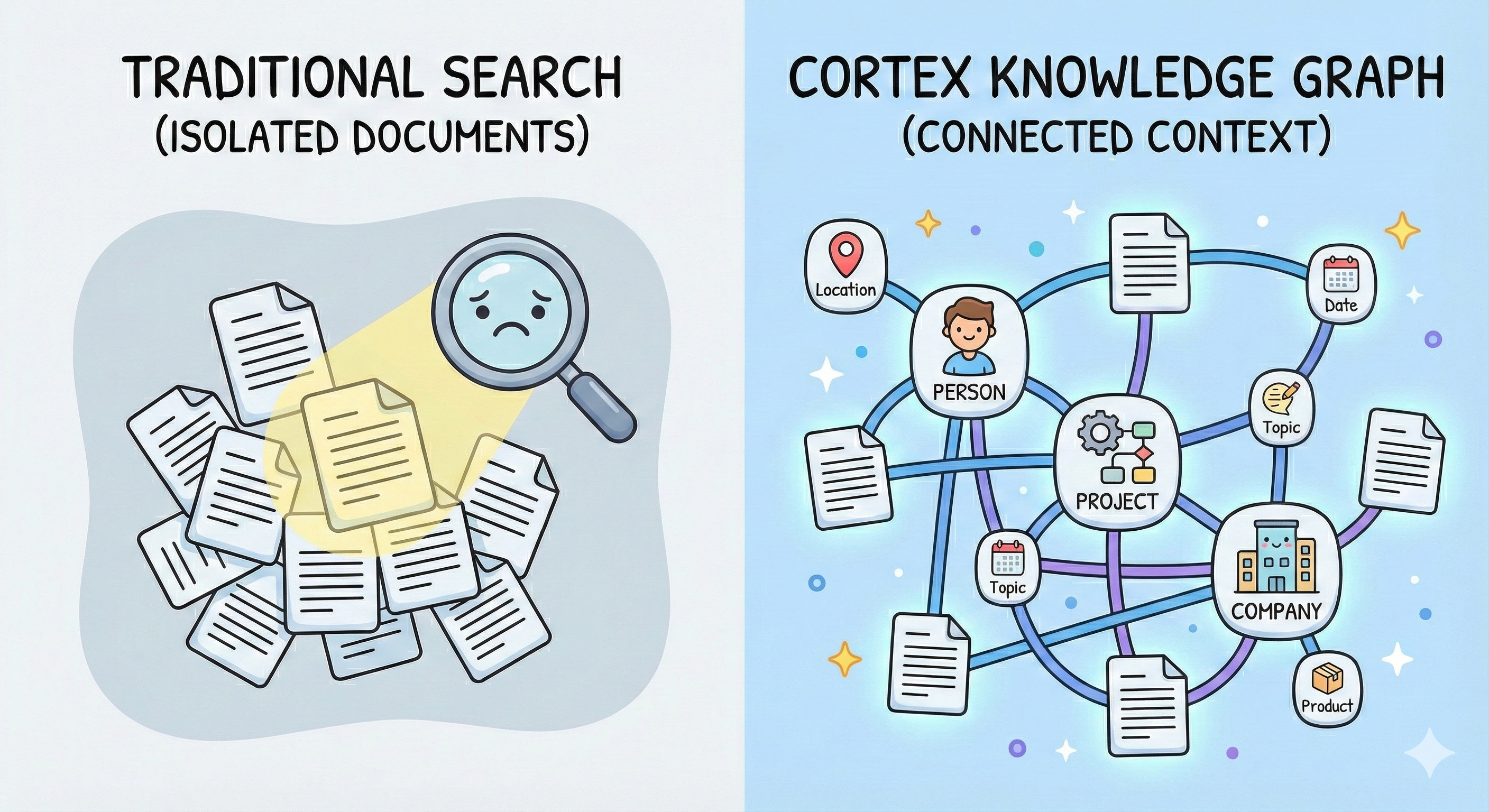
A knowledge graph is a network of entities (people, organizations, projects, products, concepts) and the relationships between them. Instead of treating each document as isolated text, Cortex understands the underlying structure of your information.
**Think of it this way**: Semantic search finds documents that *mention* similar concepts. A knowledge graph understands how those concepts *actually relate*. When you search for "Project Phoenix budget", semantic search finds documents containing those semantics. The knowledge graph knows that Sarah Chen leads Project Phoenix, which depends on the Authentication Service, was approved by the Engineering VP, and has a Q2 deadline—providing rich relational context that flat search simply cannot capture.
 ## How It Works
### Automatic Entity Extraction
When you upload content to Cortex, our system automatically:
1. **Identifies entities** in your documents (people, organizations, projects, products, technical terms, etc.)
2. **Extracts relationships** between entities with rich contextual information
3. **Builds a connected graph** that captures how everything relates
4. **Updates dynamically** as you add more content
All of this happens automatically—no manual tagging or configuration required.
**Zero Configuration Required**: Knowledge graphs are built automatically for all content you upload. There's nothing to set up or configure.
### Intelligent Entity Disambiguation
Cortex automatically resolves entity ambiguity using contextual understanding. Consider the name "Mercury"—it could refer to a team member's name, a customer company, a project codename, or the chemical element. Cortex disambiguates entities by analyzing:
* **Surrounding context**: What's being discussed when the entity is mentioned
* **Source type**: Whether it's from an email, document, meeting note, or support ticket
* **Unique identifiers**: Email addresses, employee IDs, URLs, or other identifiers that definitively identify entities
* **Relationship patterns**: Who interacts with this entity and in what capacity
This contextual intelligence ensures that "Mercury" the team member is never confused with "Mercury" the customer company or "Mercury" the project, even if all appear across your documents.
### Cross-Source Entity Linking
Cortex automatically connects entities across different sources when they share matching identifiers or appear in similar contexts:
**Automatic Connection Examples:**
* If two documents mention "John Smith" and both reference the email `john.smith@company.com`, Cortex merges them into one entity
* If a Slack conversation and a project document both discuss "Project Phoenix" with consistent context, they're automatically linked
* When multiple sources reference the same customer ID or employee number, all information is unified under one entity
**Pro Tip**: Including unique identifiers in your content (email addresses, employee IDs, ticket numbers, URLs) helps Cortex connect entities more accurately. The more specific your identifiers, the better the entity linking.
**Closing the Semantic Gap**: Traditional vector search understands meaning but not structure. It can find similar content but cannot tell you that Document A's "critical bug" is the same issue mentioned in Document B's support ticket, or that three different teams are working on related aspects of the same project. Knowledge graphs bridge this gap by understanding actual relationships, not just semantic similarity—enabling your AI to reason about connections that pure semantic search would miss.
## How It Works
### Automatic Entity Extraction
When you upload content to Cortex, our system automatically:
1. **Identifies entities** in your documents (people, organizations, projects, products, technical terms, etc.)
2. **Extracts relationships** between entities with rich contextual information
3. **Builds a connected graph** that captures how everything relates
4. **Updates dynamically** as you add more content
All of this happens automatically—no manual tagging or configuration required.
**Zero Configuration Required**: Knowledge graphs are built automatically for all content you upload. There's nothing to set up or configure.
### Intelligent Entity Disambiguation
Cortex automatically resolves entity ambiguity using contextual understanding. Consider the name "Mercury"—it could refer to a team member's name, a customer company, a project codename, or the chemical element. Cortex disambiguates entities by analyzing:
* **Surrounding context**: What's being discussed when the entity is mentioned
* **Source type**: Whether it's from an email, document, meeting note, or support ticket
* **Unique identifiers**: Email addresses, employee IDs, URLs, or other identifiers that definitively identify entities
* **Relationship patterns**: Who interacts with this entity and in what capacity
This contextual intelligence ensures that "Mercury" the team member is never confused with "Mercury" the customer company or "Mercury" the project, even if all appear across your documents.
### Cross-Source Entity Linking
Cortex automatically connects entities across different sources when they share matching identifiers or appear in similar contexts:
**Automatic Connection Examples:**
* If two documents mention "John Smith" and both reference the email `john.smith@company.com`, Cortex merges them into one entity
* If a Slack conversation and a project document both discuss "Project Phoenix" with consistent context, they're automatically linked
* When multiple sources reference the same customer ID or employee number, all information is unified under one entity
**Pro Tip**: Including unique identifiers in your content (email addresses, employee IDs, ticket numbers, URLs) helps Cortex connect entities more accurately. The more specific your identifiers, the better the entity linking.
**Closing the Semantic Gap**: Traditional vector search understands meaning but not structure. It can find similar content but cannot tell you that Document A's "critical bug" is the same issue mentioned in Document B's support ticket, or that three different teams are working on related aspects of the same project. Knowledge graphs bridge this gap by understanding actual relationships, not just semantic similarity—enabling your AI to reason about connections that pure semantic search would miss.
 ### Entity Types
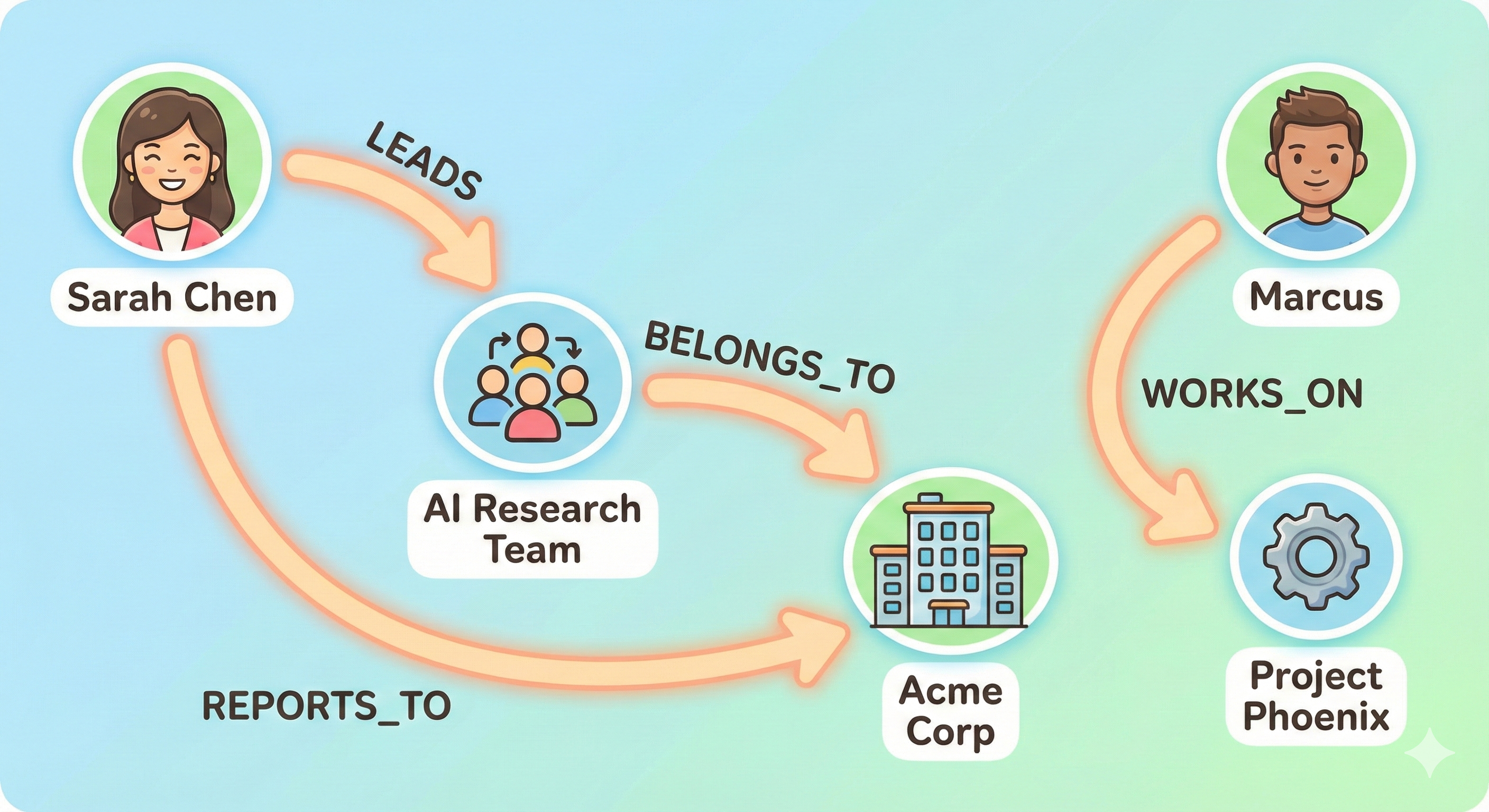
Cortex recognizes various entity types including:
* **People**: Team members, customers, stakeholders
* **Organizations**: Companies, departments, teams
* **Projects**: Initiatives, products, features
* **Technical Terms**: APIs, error codes, system components
* **Concepts**: Business processes, methodologies, frameworks
Each entity is tracked with:
* **Name**: The entity's identifier
* **Type**: What kind of entity it is
* **Namespace**: Contextual categorization (e.g., "employees", "projects", "customers")
* **Relationships**: Connections to other entities with detailed context
### Relationship Context
For every relationship between entities, Cortex captures:
* **The relationship type**: "works for", "reports to", "depends on", "caused by"
* **Rich context**: Detailed information about how and why entities are related
* **Source references**: Which documents contain evidence of this relationship
* **Temporal details**: Time-based information like "last week" or "in 2023"
## Automatic Availability
**Available Everywhere**: Knowledge graph context is automatically included in all search and retrieval responses. You don't need to make special API calls.
Every time you use Cortex's search or question-answering endpoints, the knowledge graph works behind the scenes to enhance results with relevant entity relationships.
## How to Use Graph Context
### In Search Results
When you search for information, Cortex automatically enhances results with graph context:
**What you get in each search result:**
* **`chunks[].graph_triplet_ids`**: IDs linking to specific triplets in `graph_relations.chunk_triplets`
* **`graph_relations.entity_paths`**: Multi-hop paths connecting entities from your query—often provides complete context for complex questions
* **`graph_relations.chunk_triplets`**: Individual triplets mapped by ID, referenced from each chunk
```json expandable theme={null}
{
"chunks": [
{
"chunk_uuid": "doc_a1b2c3d4e5f6...",
"chunk_content": "Sarah Chen founded Acme Corp in 2019 after leaving her role at TechGiant.",
"source_title": "company-history.md",
"relevancy_score": 0.85,
"graph_triplet_ids": ["g_0"]
},
{
"chunk_uuid": "doc_x7y8z9a0b1c2...",
"chunk_content": "Marcus Johnson joined as CTO and leads the Platform team, reporting directly to Sarah.",
"source_title": "org-structure.md",
"relevancy_score": 0.72,
"graph_triplet_ids": ["g_1", "g_2"]
}
],
"graph_relations": {
"entity_paths": [
{
"combined_context": "Sarah Chen is the founder and CEO of Acme Corp. | Marcus Johnson serves as CTO at Acme Corp. | Marcus reports directly to Sarah Chen.",
"triplets": [
{
"source": {"name": "Sarah Chen", "type": "PERSON", "namespace": "employees"},
"target": {"name": "Acme Corp", "type": "ORGANIZATION"},
"relation": {"canonical_predicate": "FOUNDER_OF", "context": "Sarah Chen founded Acme Corp in 2019."}
},
{
"source": {"name": "Marcus Johnson", "type": "PERSON", "namespace": "employees"},
"target": {"name": "Acme Corp", "type": "ORGANIZATION"},
"relation": {"canonical_predicate": "WORKS_AT", "context": "Marcus Johnson is the CTO at Acme Corp."}
},
{
"source": {"name": "Marcus Johnson", "type": "PERSON"},
"target": {"name": "Sarah Chen", "type": "PERSON"},
"relation": {"canonical_predicate": "REPORTS_TO", "context": "Marcus reports directly to Sarah."}
}
],
"relevancy_score": 0.78
}
],
"chunk_triplets": {
"g_0": {
"source": {"name": "Sarah Chen", "type": "PERSON"},
"target": {"name": "Acme Corp", "type": "ORGANIZATION"},
"relation": {"canonical_predicate": "FOUNDER_OF", "context": "Sarah Chen founded Acme Corp in 2019 after leaving TechGiant."},
"relevancy_score": 0.85
},
"g_1": {
"source": {"name": "Marcus Johnson", "type": "PERSON"},
"target": {"name": "Acme Corp", "type": "ORGANIZATION"},
"relation": {"canonical_predicate": "WORKS_AT", "context": "Marcus Johnson is the CTO at Acme Corp."},
"relevancy_score": 0.72
},
"g_2": {
"source": {"name": "Marcus Johnson", "type": "PERSON"},
"target": {"name": "Sarah Chen", "type": "PERSON"},
"relation": {"canonical_predicate": "REPORTS_TO", "context": "Marcus reports directly to Sarah as CTO."},
"relevancy_score": 0.68
}
}
}
}
```
### Understanding the Response Structure
#### Entity Paths (`graph_relations.entity_paths`)
Multi-hop paths connecting entities from your query. Each path contains a `combined_context` summarizing the full relationship chain—**this often provides all the context you need for complex, multi-hop questions**.
**When to use**: For questions like "How is X related to Y?" or "Who works with the founder?"—the `combined_context` gives you a ready-to-use summary.
#### Chunk Triplets (`graph_relations.chunk_triplets`)
A mapping of triplet IDs to individual entity relationships. Each chunk references its triplets via `graph_triplet_ids`.
**When to use**: When building context per-chunk for your LLM. Use a Set to track seen triplet IDs and avoid duplicating context across chunks.
### Practical Applications
#### Building Context for Your LLM
When passing the response to an LLM, use a Set to deduplicate triplet context across chunks:
```javascript theme={null}
const response = await cortex.search.retrieve({
query: "Who reports to Sarah?",
tenant_id: "acme-corp",
max_chunks: 10
});
const { chunks, graph_relations } = response;
const seenTriplets = new Set();
let context = "";
// Build per-chunk context with deduplicated triplets
for (const chunk of chunks) {
context += `\n---\n${chunk.chunk_content}\n`;
for (const tripletId of chunk.graph_triplet_ids || []) {
if (seenTriplets.has(tripletId)) continue;
seenTriplets.add(tripletId);
const triplet = graph_relations?.chunk_triplets?.[tripletId];
if (triplet) {
context += `[${triplet.source.name}] → ${triplet.relation.canonical_predicate} → [${triplet.target.name}]: ${triplet.relation.context}\n`;
}
}
}
// Add entity paths for multi-hop context
for (const path of graph_relations?.entity_paths || []) {
const startEntity = path.triplets[0]?.source.name;
const endEntity = path.triplets[path.triplets.length - 1]?.target.name;
context += `\n[Path: ${startEntity} → ${endEntity}]\n${path.combined_context}\n`;
}
```
```python theme={null}
response = cortex.search.retrieve(
query="Who reports to Sarah?",
tenant_id="acme-corp",
max_chunks=10
)
chunks = response.chunks
graph_relations = response.graph_relations
seen_triplets = set()
context = ""
# Build per-chunk context with deduplicated triplets
for chunk in chunks:
context += f"\n---\n{chunk.chunk_content}\n"
for triplet_id in chunk.graph_triplet_ids or []:
if triplet_id in seen_triplets:
continue
seen_triplets.add(triplet_id)
triplet = graph_relations.chunk_triplets.get(triplet_id) if graph_relations else None
if triplet:
context += f"[{triplet.source.name}] → {triplet.relation.canonical_predicate} → [{triplet.target.name}]: {triplet.relation.context}\n"
# Add entity paths for multi-hop context
for path in (graph_relations.entity_paths if graph_relations else []):
start_entity = path.triplets[0].source.name if path.triplets else None
end_entity = path.triplets[-1].target.name if path.triplets else None
context += f"\n[Path: {start_entity} → {end_entity}]\n{path.combined_context}\n"
```
#### Quick Access to Multi-Hop Context
For complex questions, `entity_paths` often provides everything you need:
```javascript theme={null}
// entity_paths gives you pre-computed multi-hop context
const paths = response.graph_relations?.entity_paths || [];
for (const path of paths) {
// combined_context has the full relationship chain summarized
console.log(path.combined_context);
// Or extract start/end entities if needed
const start = path.triplets[0]?.source;
const end = path.triplets[path.triplets.length - 1]?.target;
console.log(`${start?.name} (${start?.type}) → ... → ${end?.name} (${end?.type})`);
}
```
```python theme={null}
# entity_paths gives you pre-computed multi-hop context
paths = response.graph_relations.entity_paths if response.graph_relations else []
for path in paths:
# combined_context has the full relationship chain summarized
print(path.combined_context)
# Or extract start/end entities if needed
start = path.triplets[0].source if path.triplets else None
end = path.triplets[-1].target if path.triplets else None
print(f"{start.name} ({start.type}) → ... → {end.name} ({end.type})")
```
## Key Benefits
1. **Deeper Understanding**: Your AI doesn't just match keywords—it understands how concepts, people, and projects relate to each other.
2. **Richer Context**: Every answer is informed by the broader context of relationships, not just isolated facts.
3. **Better Relevance**: Search results include not just matching documents, but related entities that provide additional useful context.
4. **Automatic Maintenance**: The graph updates as you add content, maintaining an always-current view of your information landscape.
5. **Privacy & Isolation**: Each tenant's knowledge graph is completely isolated, ensuring data privacy and security.
## Use Cases
1. **Customer Support**: Understand relationships between error codes, affected systems, and past solutions to provide faster, more accurate support.
2. **Sales Enablement**: Connect prospects with relevant case studies, team members, and product capabilities based on relationship patterns.
3. **Research & Discovery**: Help users explore connections between research papers, authors, methodologies, and findings.
4. **Project Management**: Track relationships between team members, projects, dependencies, and deliverables automatically.
5. **Onboarding**: Help new team members understand organizational structure, project relationships, and key stakeholders.
## Best Practices
### Make the Most of Graph Context
**For search results:**
* Use `chunk_triplets` via `graph_triplet_ids` to show entities mentioned in each chunk
* Display relationship information to help users understand context at a glance
**For AI-generated answers:**
* Use `entity_paths.combined_context` for multi-hop questions—it’s often all you need
* Deduplicate `chunk_triplets` with a Set when building per-chunk context
**For UX features:**
* Create "related entities" sidebars using triplet data
* Build navigation features that follow relationship links
* Use entity mentions to create automatic cross-references
### Understanding Graph Quality
The knowledge graph gets smarter as you add more content:
* **More documents** = More complete relationship networks
* **Detailed content** = Richer relationship context
* **Clear writing** = Better entity extraction accuracy
### Privacy Considerations
* Knowledge graphs are **tenant-isolated** by default
* Each tenant's graph only contains entities from their own content
* Sub-tenants can have their own scoped graphs for additional organization
## Getting Started
Knowledge graphs work automatically—just start using Cortex's search and retrieval endpoints:
1. **Upload your content** using any [Knowledge Ingestion](/api-reference/endpoint/upload-document) endpoint
2. **Use Search or Q\&A** via [Search](/api-reference/endpoint/search) or [Q\&A](/api-reference/endpoint/qna) endpoints
3. **Access graph context** in `graph_relations.entity_paths` and `graph_relations.chunk_triplets`
4. **Enhance your UI** by displaying entity relationships alongside results
That's it! The knowledge graph is built and maintained automatically behind the scenes.
## Technical Details
**For developers interested in the underlying structure:**
Each relationship in the graph stores multiple "evidences" from different documents, allowing the system to:
* Track how relationships evolve over time
* Provide multiple sources for each connection
* Weight relationships based on frequency and relevance
* Update relationships as new information arrives
## FAQ
1. **Do I need to enable knowledge graphs?**\
No, they're automatically built for all content and included in all retrieval responses.
2. **Can I customize entity extraction?**\
The system uses advanced AI models optimized for accuracy. Custom extraction rules aren't currently exposed, but the system handles most use cases automatically.
3. **How do I see all entities in my graph?**\
Use the search endpoints with entity names to explore relationships. A dedicated graph visualization interface may be available in the future.
4. **Does this work with AI memories?**\
Yes! AI memories are also processed through the knowledge graph, helping your AI understand relationships in user-specific context.
5. **What if entity extraction makes mistakes?**\
The system uses multiple evidences to validate relationships. As you add more content, accuracy improves naturally.
6. **How is this different from vector search?**\
Vector search finds semantically similar content. Knowledge graphs understand explicit relationships. Cortex uses both together for optimal results.
### Entity Types
Cortex recognizes various entity types including:
* **People**: Team members, customers, stakeholders
* **Organizations**: Companies, departments, teams
* **Projects**: Initiatives, products, features
* **Technical Terms**: APIs, error codes, system components
* **Concepts**: Business processes, methodologies, frameworks
Each entity is tracked with:
* **Name**: The entity's identifier
* **Type**: What kind of entity it is
* **Namespace**: Contextual categorization (e.g., "employees", "projects", "customers")
* **Relationships**: Connections to other entities with detailed context
### Relationship Context
For every relationship between entities, Cortex captures:
* **The relationship type**: "works for", "reports to", "depends on", "caused by"
* **Rich context**: Detailed information about how and why entities are related
* **Source references**: Which documents contain evidence of this relationship
* **Temporal details**: Time-based information like "last week" or "in 2023"
## Automatic Availability
**Available Everywhere**: Knowledge graph context is automatically included in all search and retrieval responses. You don't need to make special API calls.
Every time you use Cortex's search or question-answering endpoints, the knowledge graph works behind the scenes to enhance results with relevant entity relationships.
## How to Use Graph Context
### In Search Results
When you search for information, Cortex automatically enhances results with graph context:
**What you get in each search result:**
* **`chunks[].graph_triplet_ids`**: IDs linking to specific triplets in `graph_relations.chunk_triplets`
* **`graph_relations.entity_paths`**: Multi-hop paths connecting entities from your query—often provides complete context for complex questions
* **`graph_relations.chunk_triplets`**: Individual triplets mapped by ID, referenced from each chunk
```json expandable theme={null}
{
"chunks": [
{
"chunk_uuid": "doc_a1b2c3d4e5f6...",
"chunk_content": "Sarah Chen founded Acme Corp in 2019 after leaving her role at TechGiant.",
"source_title": "company-history.md",
"relevancy_score": 0.85,
"graph_triplet_ids": ["g_0"]
},
{
"chunk_uuid": "doc_x7y8z9a0b1c2...",
"chunk_content": "Marcus Johnson joined as CTO and leads the Platform team, reporting directly to Sarah.",
"source_title": "org-structure.md",
"relevancy_score": 0.72,
"graph_triplet_ids": ["g_1", "g_2"]
}
],
"graph_relations": {
"entity_paths": [
{
"combined_context": "Sarah Chen is the founder and CEO of Acme Corp. | Marcus Johnson serves as CTO at Acme Corp. | Marcus reports directly to Sarah Chen.",
"triplets": [
{
"source": {"name": "Sarah Chen", "type": "PERSON", "namespace": "employees"},
"target": {"name": "Acme Corp", "type": "ORGANIZATION"},
"relation": {"canonical_predicate": "FOUNDER_OF", "context": "Sarah Chen founded Acme Corp in 2019."}
},
{
"source": {"name": "Marcus Johnson", "type": "PERSON", "namespace": "employees"},
"target": {"name": "Acme Corp", "type": "ORGANIZATION"},
"relation": {"canonical_predicate": "WORKS_AT", "context": "Marcus Johnson is the CTO at Acme Corp."}
},
{
"source": {"name": "Marcus Johnson", "type": "PERSON"},
"target": {"name": "Sarah Chen", "type": "PERSON"},
"relation": {"canonical_predicate": "REPORTS_TO", "context": "Marcus reports directly to Sarah."}
}
],
"relevancy_score": 0.78
}
],
"chunk_triplets": {
"g_0": {
"source": {"name": "Sarah Chen", "type": "PERSON"},
"target": {"name": "Acme Corp", "type": "ORGANIZATION"},
"relation": {"canonical_predicate": "FOUNDER_OF", "context": "Sarah Chen founded Acme Corp in 2019 after leaving TechGiant."},
"relevancy_score": 0.85
},
"g_1": {
"source": {"name": "Marcus Johnson", "type": "PERSON"},
"target": {"name": "Acme Corp", "type": "ORGANIZATION"},
"relation": {"canonical_predicate": "WORKS_AT", "context": "Marcus Johnson is the CTO at Acme Corp."},
"relevancy_score": 0.72
},
"g_2": {
"source": {"name": "Marcus Johnson", "type": "PERSON"},
"target": {"name": "Sarah Chen", "type": "PERSON"},
"relation": {"canonical_predicate": "REPORTS_TO", "context": "Marcus reports directly to Sarah as CTO."},
"relevancy_score": 0.68
}
}
}
}
```
### Understanding the Response Structure
#### Entity Paths (`graph_relations.entity_paths`)
Multi-hop paths connecting entities from your query. Each path contains a `combined_context` summarizing the full relationship chain—**this often provides all the context you need for complex, multi-hop questions**.
**When to use**: For questions like "How is X related to Y?" or "Who works with the founder?"—the `combined_context` gives you a ready-to-use summary.
#### Chunk Triplets (`graph_relations.chunk_triplets`)
A mapping of triplet IDs to individual entity relationships. Each chunk references its triplets via `graph_triplet_ids`.
**When to use**: When building context per-chunk for your LLM. Use a Set to track seen triplet IDs and avoid duplicating context across chunks.
### Practical Applications
#### Building Context for Your LLM
When passing the response to an LLM, use a Set to deduplicate triplet context across chunks:
```javascript theme={null}
const response = await cortex.search.retrieve({
query: "Who reports to Sarah?",
tenant_id: "acme-corp",
max_chunks: 10
});
const { chunks, graph_relations } = response;
const seenTriplets = new Set();
let context = "";
// Build per-chunk context with deduplicated triplets
for (const chunk of chunks) {
context += `\n---\n${chunk.chunk_content}\n`;
for (const tripletId of chunk.graph_triplet_ids || []) {
if (seenTriplets.has(tripletId)) continue;
seenTriplets.add(tripletId);
const triplet = graph_relations?.chunk_triplets?.[tripletId];
if (triplet) {
context += `[${triplet.source.name}] → ${triplet.relation.canonical_predicate} → [${triplet.target.name}]: ${triplet.relation.context}\n`;
}
}
}
// Add entity paths for multi-hop context
for (const path of graph_relations?.entity_paths || []) {
const startEntity = path.triplets[0]?.source.name;
const endEntity = path.triplets[path.triplets.length - 1]?.target.name;
context += `\n[Path: ${startEntity} → ${endEntity}]\n${path.combined_context}\n`;
}
```
```python theme={null}
response = cortex.search.retrieve(
query="Who reports to Sarah?",
tenant_id="acme-corp",
max_chunks=10
)
chunks = response.chunks
graph_relations = response.graph_relations
seen_triplets = set()
context = ""
# Build per-chunk context with deduplicated triplets
for chunk in chunks:
context += f"\n---\n{chunk.chunk_content}\n"
for triplet_id in chunk.graph_triplet_ids or []:
if triplet_id in seen_triplets:
continue
seen_triplets.add(triplet_id)
triplet = graph_relations.chunk_triplets.get(triplet_id) if graph_relations else None
if triplet:
context += f"[{triplet.source.name}] → {triplet.relation.canonical_predicate} → [{triplet.target.name}]: {triplet.relation.context}\n"
# Add entity paths for multi-hop context
for path in (graph_relations.entity_paths if graph_relations else []):
start_entity = path.triplets[0].source.name if path.triplets else None
end_entity = path.triplets[-1].target.name if path.triplets else None
context += f"\n[Path: {start_entity} → {end_entity}]\n{path.combined_context}\n"
```
#### Quick Access to Multi-Hop Context
For complex questions, `entity_paths` often provides everything you need:
```javascript theme={null}
// entity_paths gives you pre-computed multi-hop context
const paths = response.graph_relations?.entity_paths || [];
for (const path of paths) {
// combined_context has the full relationship chain summarized
console.log(path.combined_context);
// Or extract start/end entities if needed
const start = path.triplets[0]?.source;
const end = path.triplets[path.triplets.length - 1]?.target;
console.log(`${start?.name} (${start?.type}) → ... → ${end?.name} (${end?.type})`);
}
```
```python theme={null}
# entity_paths gives you pre-computed multi-hop context
paths = response.graph_relations.entity_paths if response.graph_relations else []
for path in paths:
# combined_context has the full relationship chain summarized
print(path.combined_context)
# Or extract start/end entities if needed
start = path.triplets[0].source if path.triplets else None
end = path.triplets[-1].target if path.triplets else None
print(f"{start.name} ({start.type}) → ... → {end.name} ({end.type})")
```
## Key Benefits
1. **Deeper Understanding**: Your AI doesn't just match keywords—it understands how concepts, people, and projects relate to each other.
2. **Richer Context**: Every answer is informed by the broader context of relationships, not just isolated facts.
3. **Better Relevance**: Search results include not just matching documents, but related entities that provide additional useful context.
4. **Automatic Maintenance**: The graph updates as you add content, maintaining an always-current view of your information landscape.
5. **Privacy & Isolation**: Each tenant's knowledge graph is completely isolated, ensuring data privacy and security.
## Use Cases
1. **Customer Support**: Understand relationships between error codes, affected systems, and past solutions to provide faster, more accurate support.
2. **Sales Enablement**: Connect prospects with relevant case studies, team members, and product capabilities based on relationship patterns.
3. **Research & Discovery**: Help users explore connections between research papers, authors, methodologies, and findings.
4. **Project Management**: Track relationships between team members, projects, dependencies, and deliverables automatically.
5. **Onboarding**: Help new team members understand organizational structure, project relationships, and key stakeholders.
## Best Practices
### Make the Most of Graph Context
**For search results:**
* Use `chunk_triplets` via `graph_triplet_ids` to show entities mentioned in each chunk
* Display relationship information to help users understand context at a glance
**For AI-generated answers:**
* Use `entity_paths.combined_context` for multi-hop questions—it’s often all you need
* Deduplicate `chunk_triplets` with a Set when building per-chunk context
**For UX features:**
* Create "related entities" sidebars using triplet data
* Build navigation features that follow relationship links
* Use entity mentions to create automatic cross-references
### Understanding Graph Quality
The knowledge graph gets smarter as you add more content:
* **More documents** = More complete relationship networks
* **Detailed content** = Richer relationship context
* **Clear writing** = Better entity extraction accuracy
### Privacy Considerations
* Knowledge graphs are **tenant-isolated** by default
* Each tenant's graph only contains entities from their own content
* Sub-tenants can have their own scoped graphs for additional organization
## Getting Started
Knowledge graphs work automatically—just start using Cortex's search and retrieval endpoints:
1. **Upload your content** using any [Knowledge Ingestion](/api-reference/endpoint/upload-document) endpoint
2. **Use Search or Q\&A** via [Search](/api-reference/endpoint/search) or [Q\&A](/api-reference/endpoint/qna) endpoints
3. **Access graph context** in `graph_relations.entity_paths` and `graph_relations.chunk_triplets`
4. **Enhance your UI** by displaying entity relationships alongside results
That's it! The knowledge graph is built and maintained automatically behind the scenes.
## Technical Details
**For developers interested in the underlying structure:**
Each relationship in the graph stores multiple "evidences" from different documents, allowing the system to:
* Track how relationships evolve over time
* Provide multiple sources for each connection
* Weight relationships based on frequency and relevance
* Update relationships as new information arrives
## FAQ
1. **Do I need to enable knowledge graphs?**\
No, they're automatically built for all content and included in all retrieval responses.
2. **Can I customize entity extraction?**\
The system uses advanced AI models optimized for accuracy. Custom extraction rules aren't currently exposed, but the system handles most use cases automatically.
3. **How do I see all entities in my graph?**\
Use the search endpoints with entity names to explore relationships. A dedicated graph visualization interface may be available in the future.
4. **Does this work with AI memories?**\
Yes! AI memories are also processed through the knowledge graph, helping your AI understand relationships in user-specific context.
5. **What if entity extraction makes mistakes?**\
The system uses multiple evidences to validate relationships. As you add more content, accuracy improves naturally.
6. **How is this different from vector search?**\
Vector search finds semantically similar content. Knowledge graphs understand explicit relationships. Cortex uses both together for optimal results.